Examples
Pre-requisites
In all of the following examples, we assume that:
- The python environment used for the specific project is set up.
- Cargo is installed and available (see pre-requisites).
boxis installed and available.
qtcowsay
The following is an example on how to use box with a GUI project.
We will use qtcowsay,
a simple PyQt6 wrapper around
cowsay, as an example.
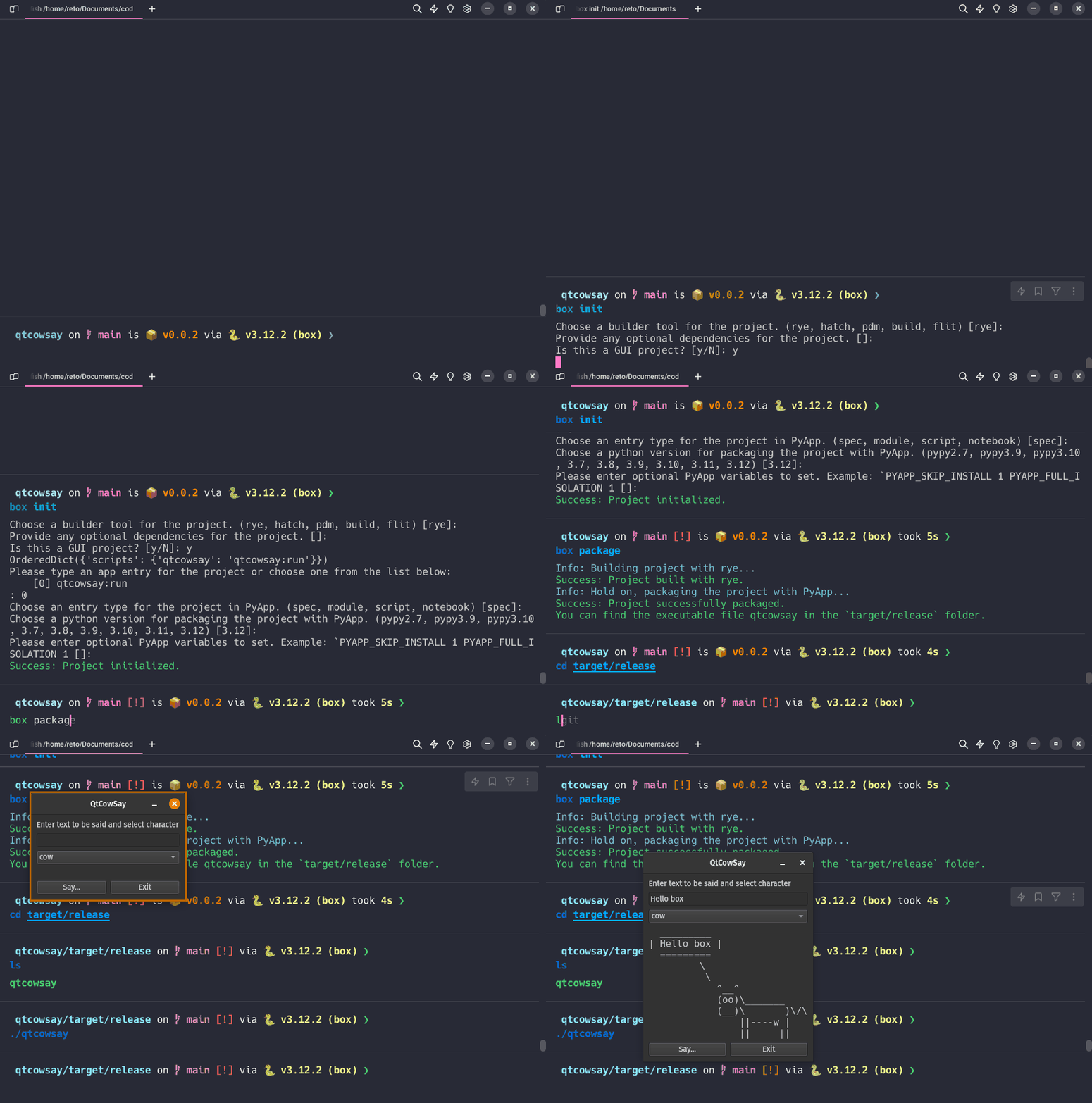
Step-by-step instructions
- Clone the repository and navigate to the project directory. In the example case, the project is setup using
rye. - Initialize this project as a
boxproject by typingbox init.- Choose a builder: Here we choose
rye(default). - Provide optional dependnecies - not necessary for this project (default).
- Answer if this is a GUI project: Yes.
- Provide the app entry point: The automatically selected point is correct, so we choose from the list - option 0.
- Choose the App entry type according to PyApp's options: Here we use
spec. - Provide the Python version to package with: Here we use the default
3.12.
- Choose a builder: Here we choose
- After successfull initialization, we package the project with
box package. This first builds the package and then packages it with PyApp. Hold on... - The executable is now in
target/release. - Run the executable!
Note
Packaging the project the first time will take a while. Use box package -v to get verbose output to follow the progress.